



Introducing the New "Internal Search" Feature on Chessify
Our new Internal Search feature allows to find your PGNs by position. Say goodbye to scrolling through countless files, only see the ones that matter.
We are excited to announce the new "Internal Search" feature on Chessify that will significantly enhance your chess training experience. This new functionality allows you to quickly and easily search through your PGN files by position. This means you can find the exact training materials you need, at the moment you need them, with just a few clicks.
With the "Internal Search" feature enabled, you will be shown only those files that include the position on your chessboard. This allows you to save time by avoiding the need to manually search through all your files to find what you're looking for.
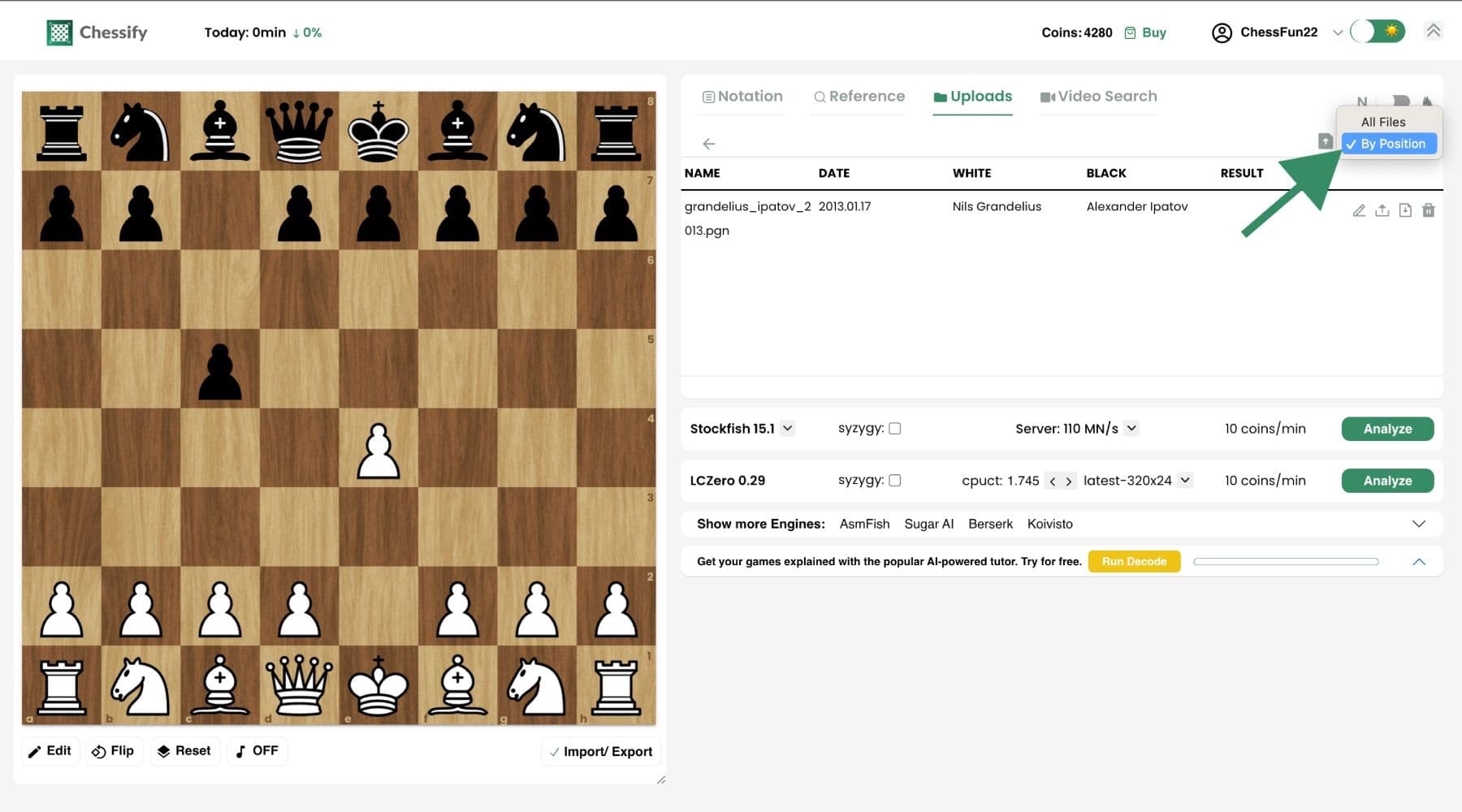
if you have multiple PGN files and need to find specific files quicker, take advantage of our new functionality:
- - Sign in to chessify.me/analysis
- - Go to the "Uploads" tab
- - Click on "All Files" from the top right corner as shown in the screenshot
- - Select "By Position"
- - Play some moves on the chessboard or set an exact position
- - Open a folder from your "Uploads" tab and you'll see only those files that include the position on your board.
We believe that the "Internal Search" feature will be a valuable addition to the Chessify analysis dashboard and greatly benefit our users. If you have any questions or suggestions, please feel free to contact us.
Happy training!


