

Open Multiple Games and Files in New Tabs
You can now open several PGN files and games in a single Chessify window. The files will open in separate tabs to avoid losing your previous game.
The latest update of our Analysis Dashboard introduces the new multiple-tabs feature which will make your training more convenient.
This new feature allows you to open new files or games without overwriting your previous game. If you choose a file from your saved PGNs or click on a game from the Reference section, the game will open in a new tab, next to your previous game.
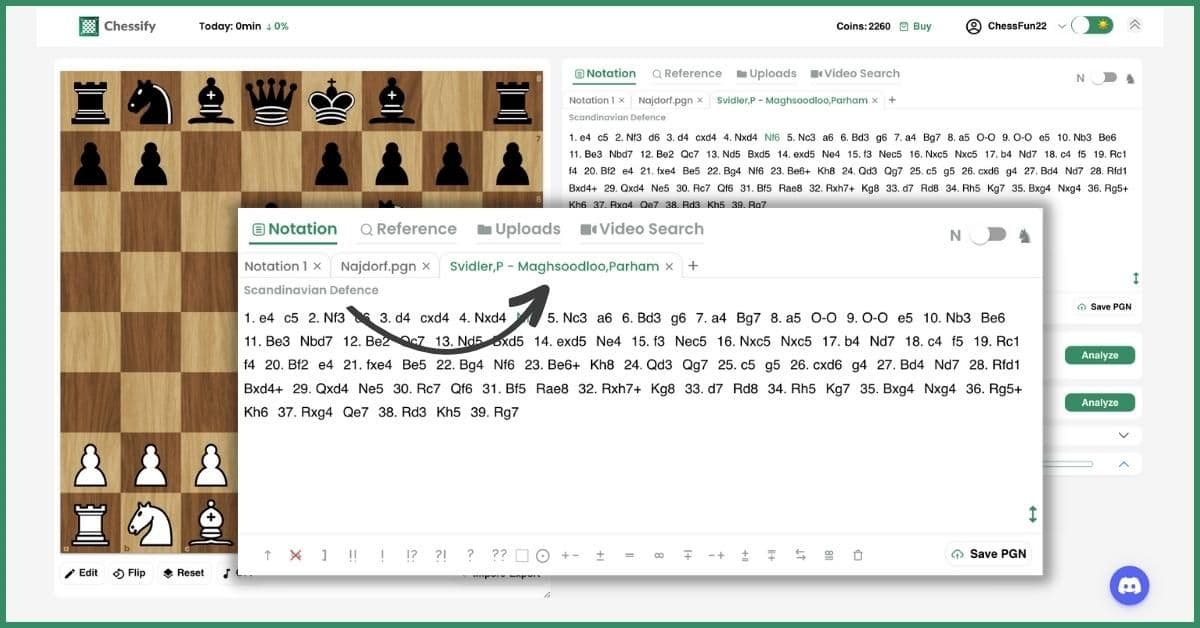
You can change the names of your tabs by double-clicking on the particular tab. After you change its name, just hit "Enter" to save your changes.
The introduction of multiple tabs solves the problem of losing your previous unsaved PGN. Previously, if you clicked on a game from our Reference section, the game would appear in the place of your previous notation, overwriting the latter. Now, the game will open in a separate tab and will not affect your previous notation.
What happens if you open a new tab while engines are running on the other one
You can run engines in one of the tabs only. If you have Stockfish and other engines running in one of the tabs, you can still switch to another tab and view its game. However, you'll lose the view of the engines and they will continue analyzing the tab they are running in.
In case you open the tab in which your engines are running, the tap will close, and the engines will move to the next tab and start analyzing the new position.
We're sure this feature will be a great addition to your chess training on Chessify. To give it a try, just log in to your account or register for free.
If you need help with using any of our features, you may find tutorials on our YouTube channel. You may find some of the helpful video links related to this topic below:


